Swiss-grade precision for your frontend
That monolithic frontend you've been avoiding? You can open it again.
LLM Contextual Tutoring
Targeted exports from Frontinus to your LLM
Swiss Precision
Every finding pinpointed to the exact line and column
Optimized Workflow
Scan & Map - Triage & Classify - Fix & Verify
⚡ Beta Preview
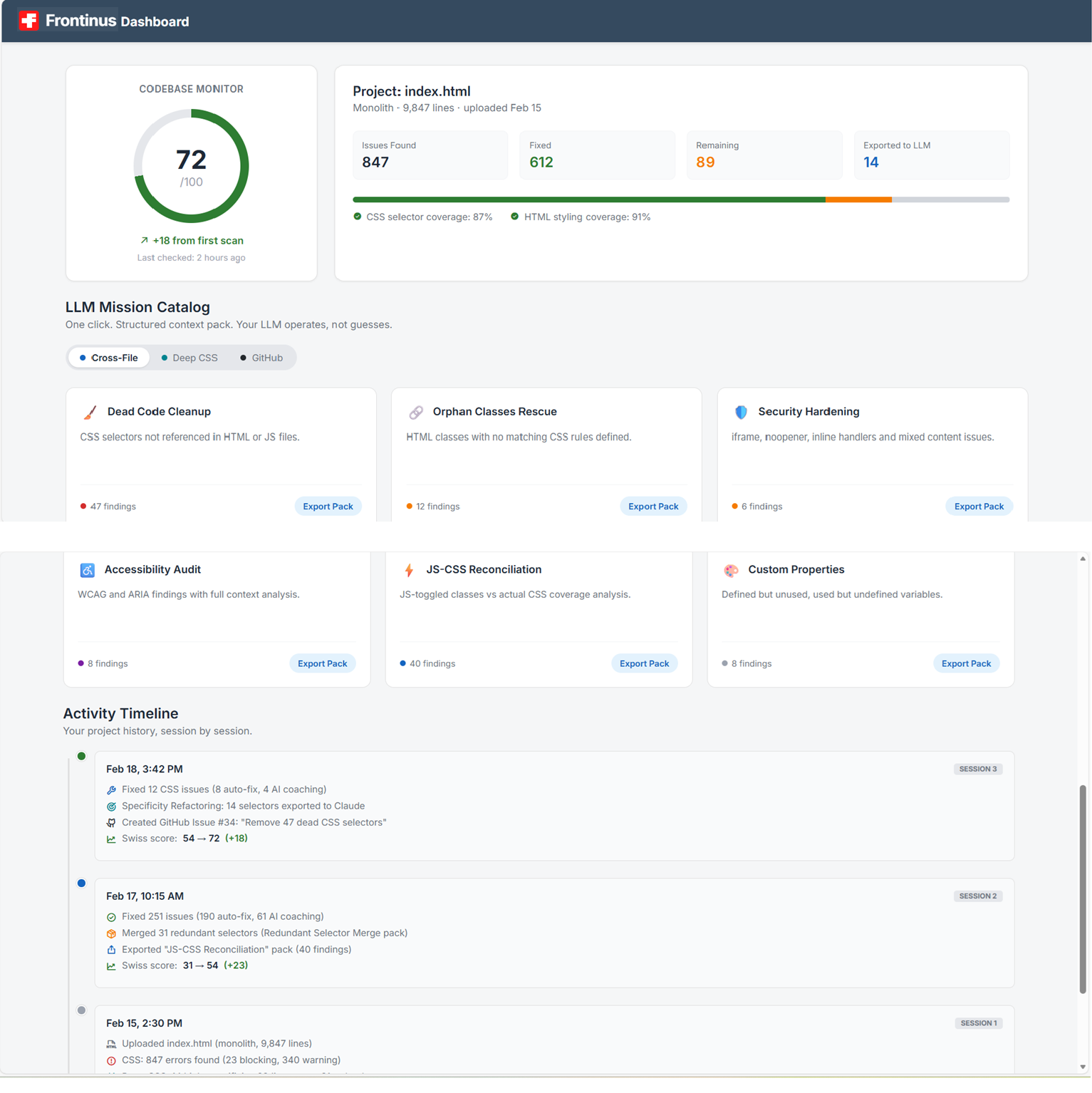
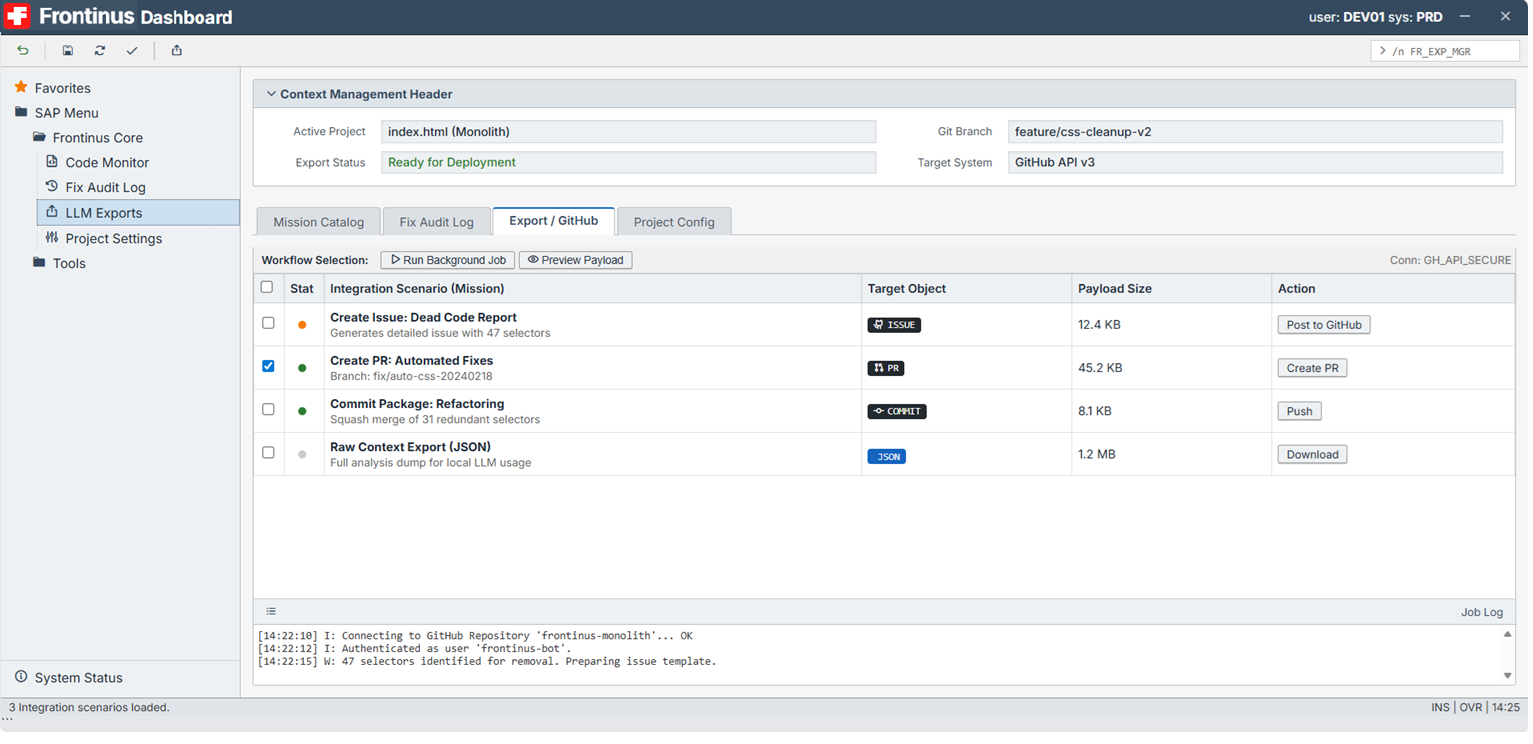
The Mission Control for Your Codebase
Track your project health session after session. Launch targeted LLM missions — from dead code cleanup to specificity refactoring — each one a structured context pack, one click away. See your score rise, review what you've fixed, and always know what's next.
Coming soon: LLM missions, GitHub workflows, full audit timeline.
You're early. Help us shape what ships next.
Modern Cloud 50%
Classic Density 50%
Results are live — your vote shapes what ships first.
Thanks. We build what you need.
Your preference decides what we build.
One plan. No surprises.
EARLY ADOPTER
Swiss Pro
€19
€9.90/mo
First 100 subscribers — locked at this price forever.
- 14-day free trial — full access
- Unlimited Projects
- AI Refactoring Engine
- Cross-reference analysis (CSS · HTML · JS)
- Priority Support
No credit card required.
Pause anytime — your projects stay safe.
Questions
What kind of files can I upload?
You can upload a monolithic HTML file with embedded <style> blocks, or separate CSS and HTML files independently. JavaScript is analyzed as additional context when uploaded alongside HTML — it powers cross-reference detection for JS-toggled classes and DOM interactions. No build step, no configuration, no node_modules. Upload, scan, work.
Does Frontinus support React or Tailwind?
Frontinus is built around modules. The CSS Module — available now — targets what most production codebases actually contain: monolithic files, embedded styles, and years of accumulated decisions. Legacy is the real problem. React and Tailwind modules are in active development — same structure, dedicated engines. Not a port.
Is this just a linter? How is it different from ESLint or Stylelint?
Linters catch syntax and rule violations. Frontinus maps relationships — between your CSS, HTML, and JS — and packages findings as structured context packs for your LLM. The goal isn't to flag errors. It's to give Claude or GPT exactly what they need to fix them without guessing.
What happens when my free trial ends?
After the 14-day trial, you'll need to subscribe to keep working — no automatic charges. If you don't, your account is locked but nothing is deleted: your projects stay exactly as you left them. Subscribe anytime to pick up right where you left off.
What if I need a break?
Cancel anytime — no charge until you resubscribe. Your projects aren't touched: everything stays exactly where you left it. When you're ready, resubscribe (monthly or annual) and you're back in instantly — no re-upload, no re-setup.
Where is my data stored?
Your project is stored in an isolated environment tied to your account. You can resume your work anytime and delete it whenever you choose. Only essential cookies are active by default — analytics and marketing require your explicit consent.
Is my source code secure?
Only you can access your source code through the application. Our team may access project data only when necessary to provide support, fix bugs, or ensure service reliability — never for any other purpose. Your code is never used to train AI models.